Tidy up
A calmer camera roll.
FirstHour looks through the pictures on your iPhone and sorts them into groups, so you can clear the pile a little at a time.
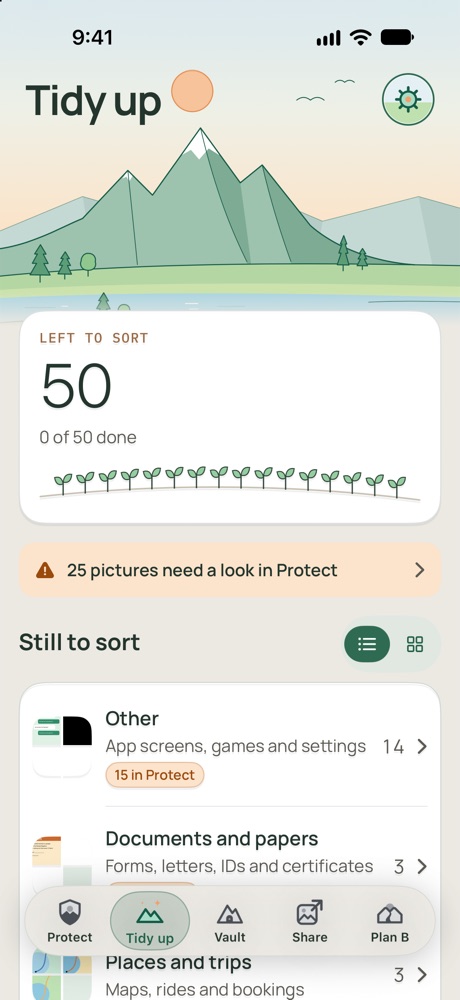
What it does
Sorts for you
Groups like People, Receipts, Chats, Shopping, Documents and papers, Places and trips, and Pets and animals.
Shows what's left
See how many pictures are left to sort. Finished groups fold away into a Done row, and you can put them back.
Keep all
Mark a whole group as done. Nothing changes in Photos, and you can change your mind.
Clears the clutter
Delete a group of things like receipts or old screenshots in one go. People, Food and drinks, Pets and animals, Outdoors and Other photos don't get that button, so one tap can't clear them.
Bursts and duplicates
Finds many shots taken at once and pictures saved more than once. One button clears the extras from all of them, and iPhone asks once.
What's new
Check for new pictures whenever you like. Each group shows how many are new since last time.
How it works
- Start the check. Tap Check my pictures. iPhone asks whether FirstHour may see your photos. Then tap Check my pictures in Tidy up to begin.
- Let it look. Your pictures are read on your iPhone and never uploaded. If you close the app, it picks up where it stopped.
- Work through a group. Keep all, review one by one or, where it's offered, delete all. iPhone asks before anything leaves Photos.
Good to know
- It doesn't check videos.
- It doesn't check pictures in your Hidden album.
- If you only give it some of your photos, it checks only those.
- Pictures that may show a card, an ID or a code go to Protect instead of these groups.
- Sorting isn't perfect, so a picture can land in the wrong group. Look through a group before you delete it.